# Introduction
**Salvo Team** develops a cutting-edge **BTC Ordinals** trading platform. It supports trading of **BTC Ordinals NFTs**, **BRC-20 tokens**, and aims to be the best BTC Ordinals marketplace. With a focus on user experience, Salvo is committed to reducing transaction costs, improving security, and supporting the flourishing development and innovation of the Bitcoin ecosystem.
Salvo offers an **ultra-low transaction fee of 0.5%** (1% for non-holders of **Salvo** OG Pass), which offers traders a competitive edge on transaction costs compared to other platforms. Additionally, **Salvo** provides project creators with the freedom to set **royalties (0%-10%)** when launching projects.
{% hint style="info" %}
The limited-time Zero Fee Trading Offer has now ended.
{% endhint %}
Backed by the solid Bitcoin technology strength of the Salvo team, **Salvo** has significant transaction advantages, and its stable, efficient, and high-quality user experience will bring innovative experiences to the Ordinals market!
| Platform | Magic Eden | UniSat | **Salvo** |
| -------------------------- | --------------------------------------------------------- | ------------------------------------------- | ------------------- |
| Inscription Service Fee | **3000 sats** 1500 sats (Magic Eden) 1500 sats (Donation) | 1999 sats **Gas × 4.99%**(inscription size) | 1999 → **800 sats** |
| NFT - Buy | 2% | 0.8% | 1% → **0.5%(OG)** |
| NFT - Sell | 0.5% | **0%** | **0%** |
| BRC20 - Buy | 2% → 0.1% | 0.8% | 1% → **0.5%(OG)** |
| BRC20 - Sell | **0%** | **0%** | **0%** |
| BRC20 Transfer Inscription | **3000 sats** 1500 sats (Magic Eden) 1500 sats (Donation) | 1999 sats | 1999 → **800 sats** |
{% embed url="" %}
Salvo - BTC Ordinals | BRC20
{% endembed %}
# User Manual
## Listing & Purchasing Tutorial
### Connecting Wallets
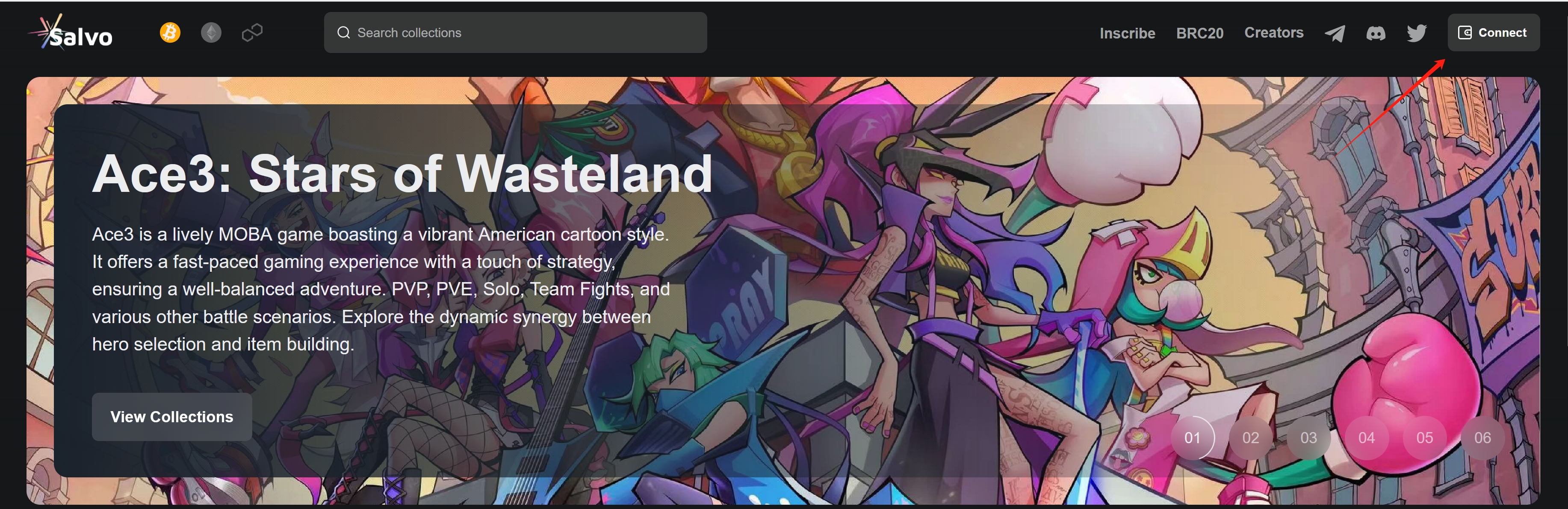
1. First visit market.salvo.games, then select the BTC icon on the top-left navigation bar, and finally click the Connect Wallet button on the top right corner.
2. salvo.games now supports *Unisat* and *Xverse* as wallets for BTC transacting, select the wallet of your choice.
3. If this prompt appears on the right side of the web, your wallet has been connected.
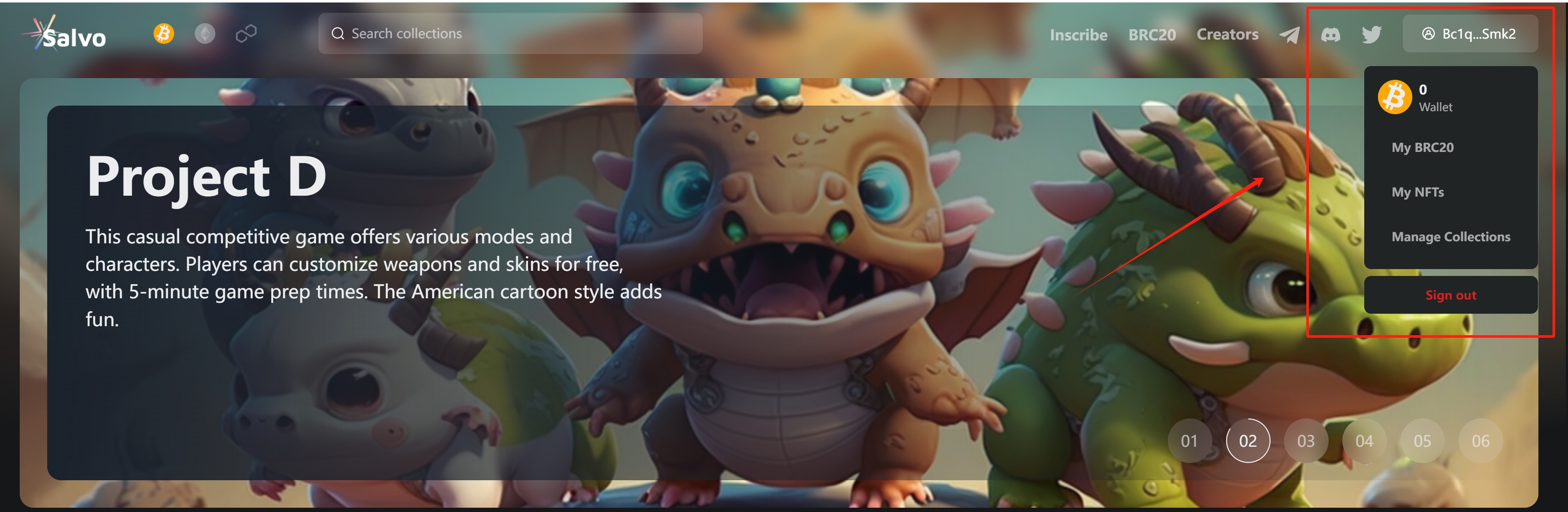
4. When your wallet is completed, you can click the button showing your wallet address on the top-right corner to reveal more wallet options:
* A display of your wallet balance;
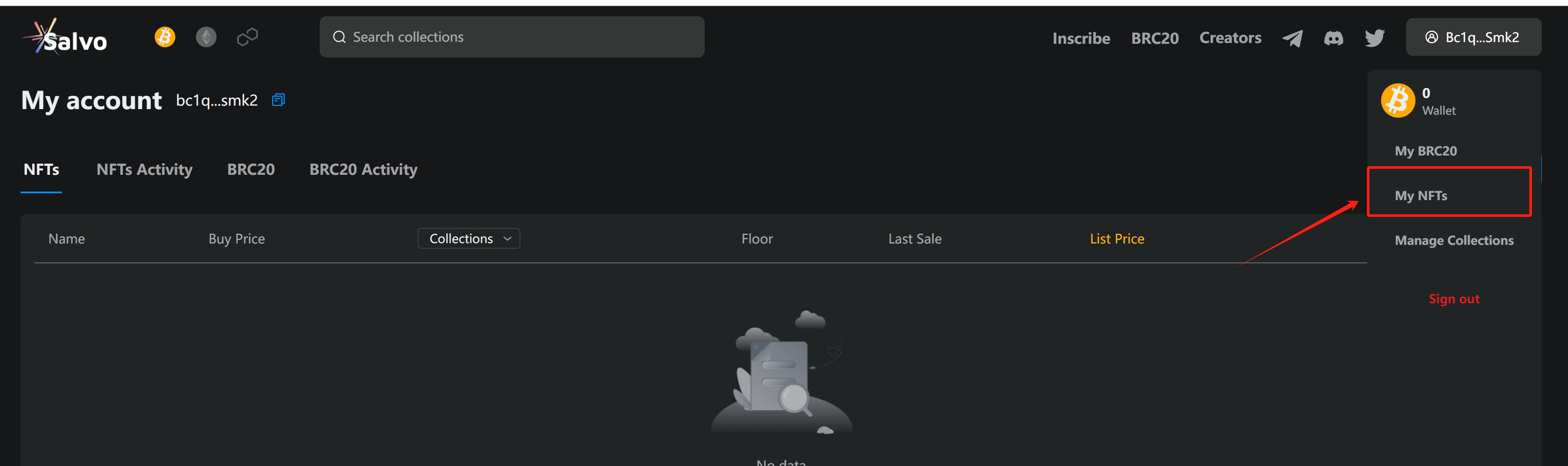
* My NFTs: Directs you to *My Account* page and shows the NFTs you hold;
* Sign out: Signs out of your wallet.
### Listing Inscritions
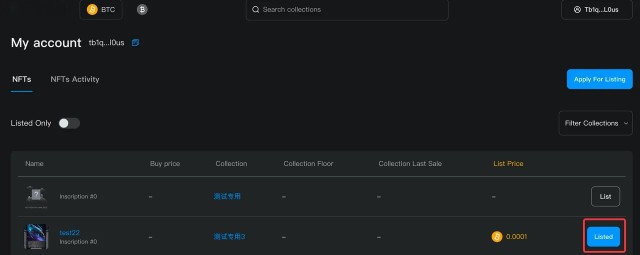
1. Select *My NFTs* from your wallet options to display all the inscriptions owned by this address. Select *List* to enter the *List for Sale* option.
2. Enter your *Sale Price* in the *List for Sale* window (price must be more than 0.0001 BTC, otherwise the *Confirm* button would be greyed out); the Confirm button will be clickable when everything is set up correctly; A USD value of your Sale Price will be automatically calculated and displayed, click *Confirm* when you're satisfied with everything.
3. Click *Confirm* to trigger the *Sign Transaction* window; when you're satisfied with the price, click *Sign* to confirm to complete the listing action.
4. If this prompt appears, your listing has been completed.
### Canceling Listing
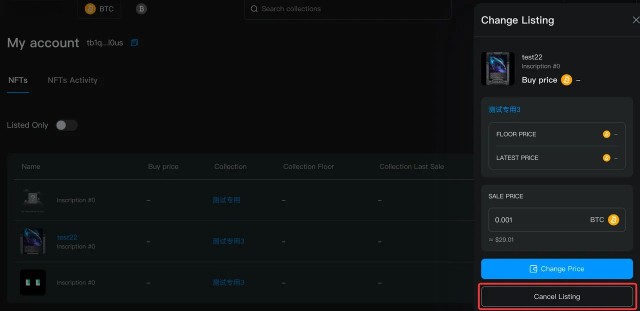
1. Select *My NFTs* from your wallet options to display all the inscriptions owned by this address. Select *Listed* to enter the *Change Listing* option.
2. Click *Cancel Listing* in the *Change Listing* window.
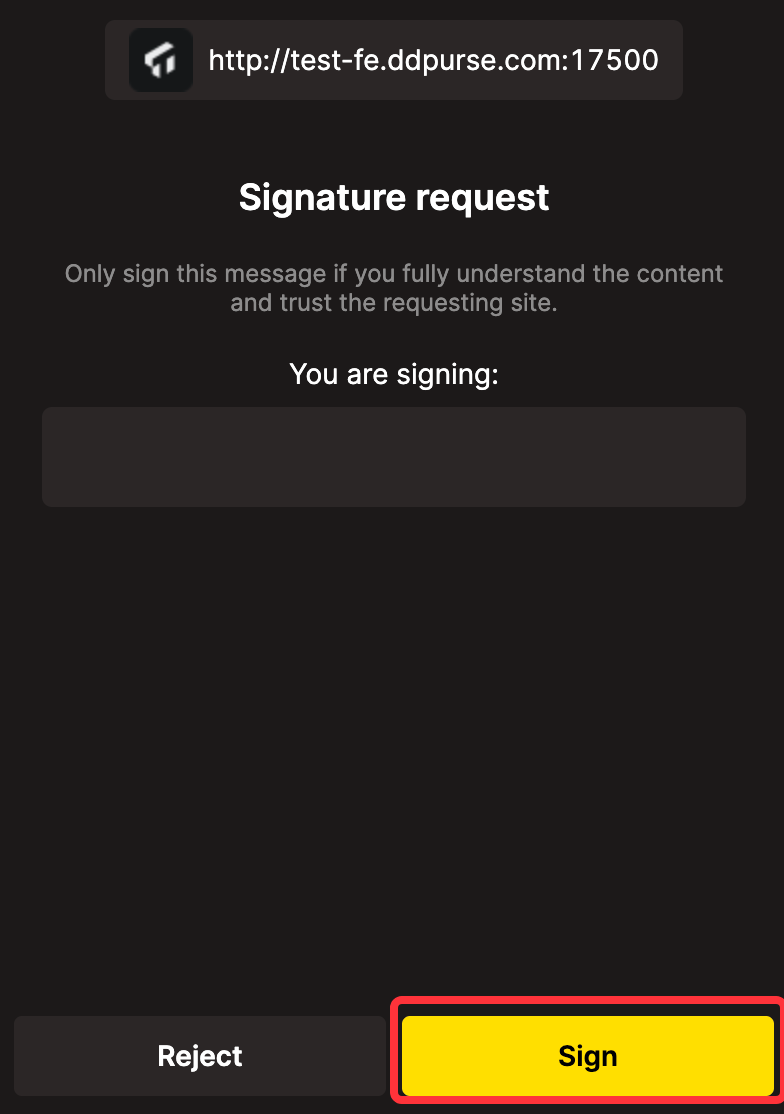
3. Click *Confirm* to trigger the *Signature request* window; click *Sign* to confirm to cancel the listing.
3. If this prompt appears, your listing has been canceled.
### Changing Listing Price
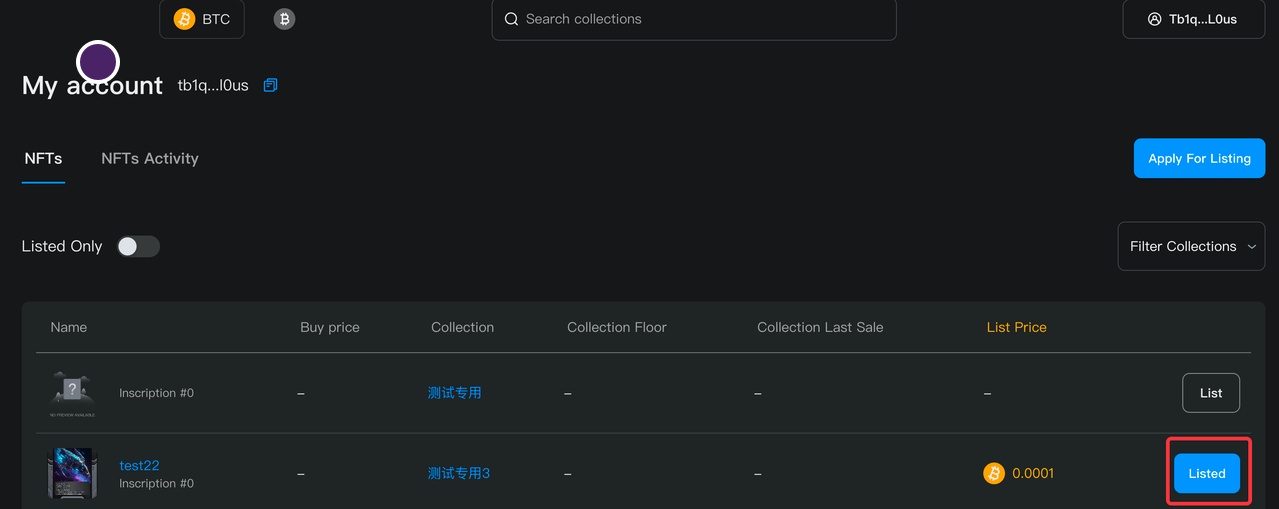
1. Select *My NFTs* from your wallet options to display all the inscriptions owned by this address. Select *Listed* to enter the *Change Listing* option.
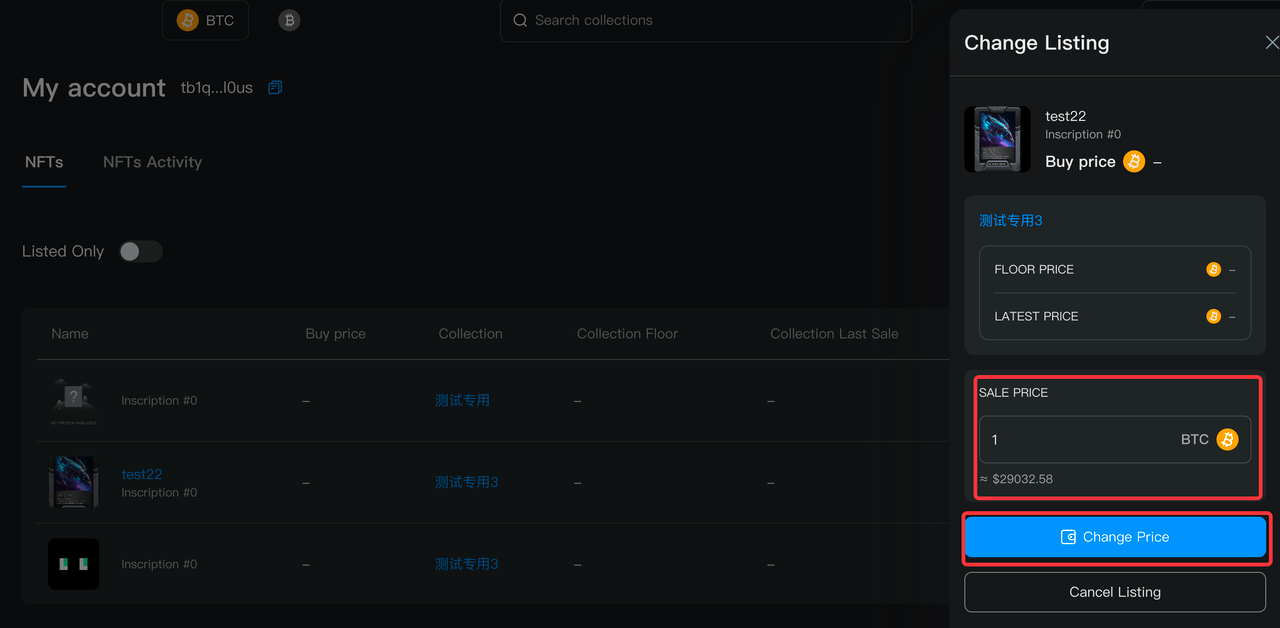
2. Enter the new *Sale Price* in the *Change Listing* window (price must be more than 0.0001 BTC, otherwise the *Confirm* button would be greyed out); click *Change Price* when you're satisfied with the new price.
3. Click *Change Price* to trigger the *Sign Transaction* window; click *Sign* to confirm to change the listing price.
4. If this prompt appears, your listing price has been changed.
### Purchasing Inscriptions
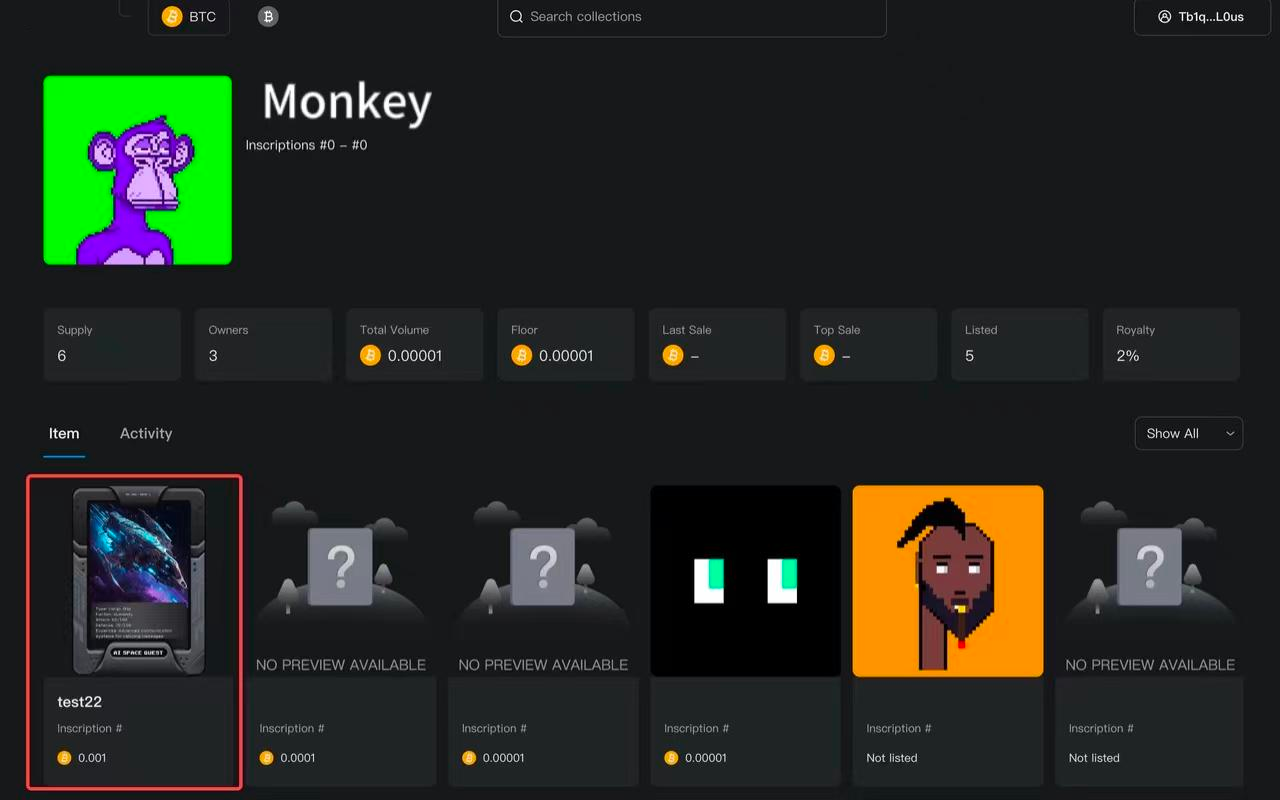
1. After your wallet is connected, you can choose and enter the *Collection Details* page of your desired inscription collection from Salvo home.
2. In the *Collection Details* page, you can choose and enter the *Item Details* page of any inscription you like.
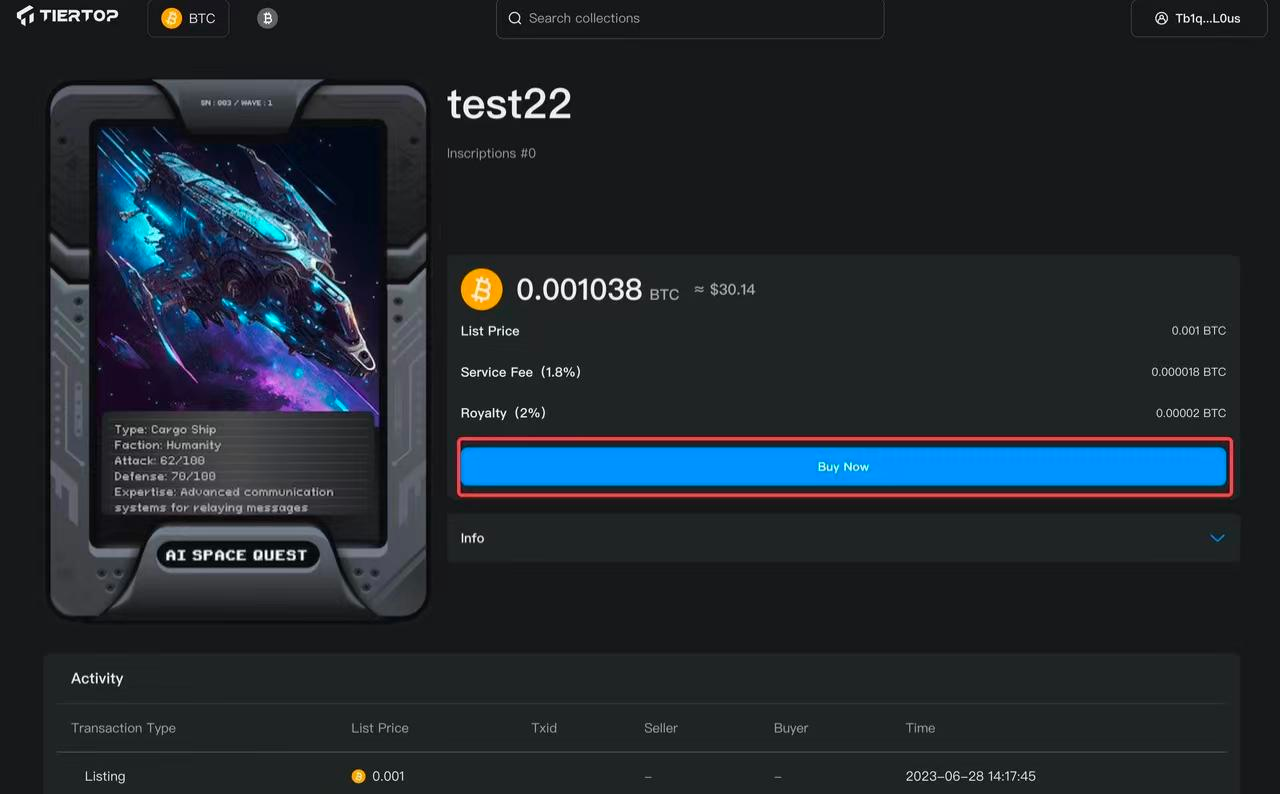
3. In the *Item Details* page, the total price (listing price + service fee + royalty) is displayed; click Buy Now to purchase this inscription.
### Sweeping/Bulk Purchasing
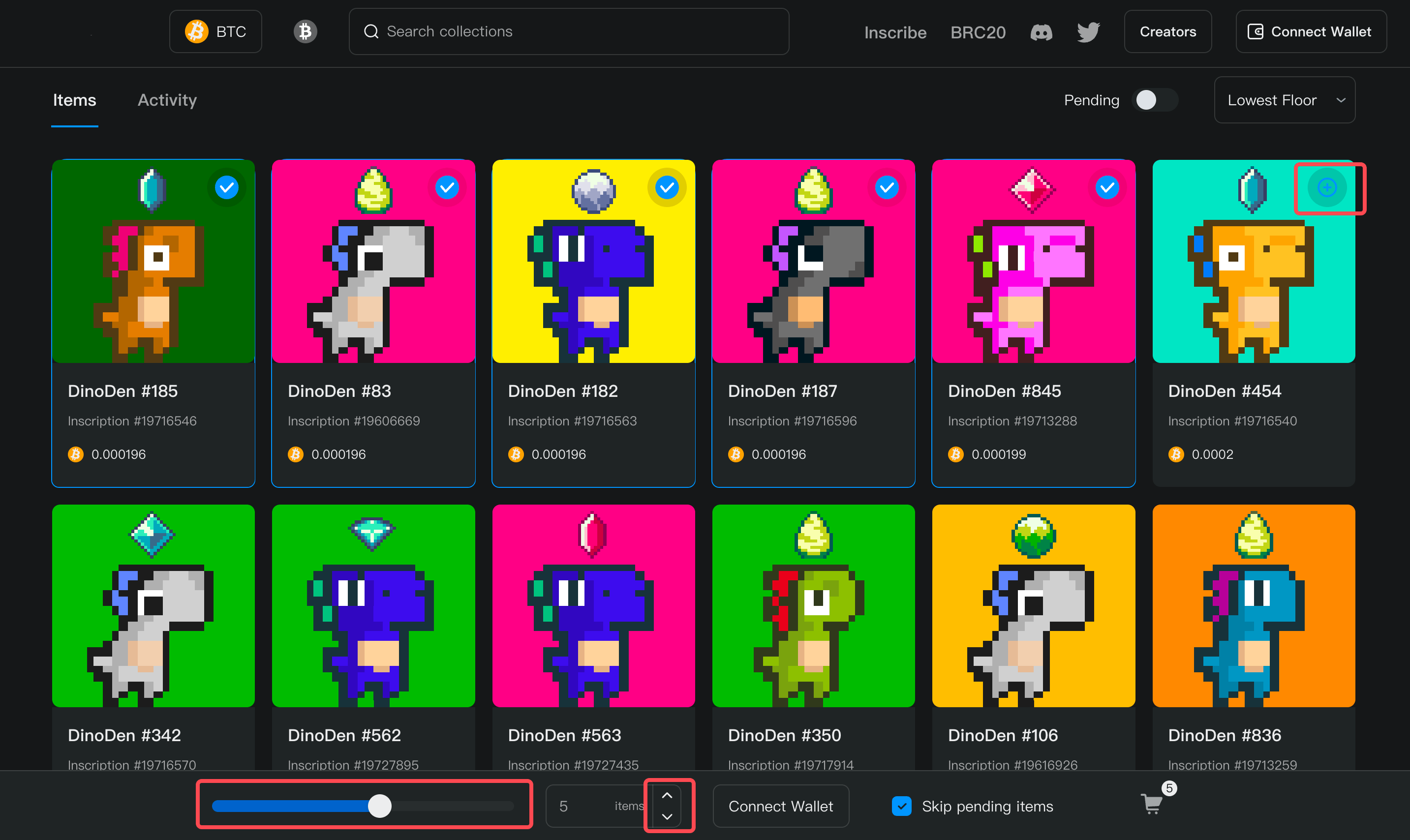
1. Go to the collection details of the Ordinals you'd like to sweep/bulk purchase:
2. Select multiple Ordinals by clicking the ⊕ button, sliding the slider, or clicking on the item chaging buttons on the bottom of the page.
3. click on ***Connect Wallet*** to connect your wallet if you haven't.
4. Click on the total price or the shopping cart symbol to bring up the Payment menu.
5. After confirming all the payment details, click on ***Pay*** to and sign the payment transaction in your wallet to complete the bulk purchasing.
# Salvo Marketplace Features
{% content-ref url="/pages/sdeyjDlI3y4vZwYQbHHz" %}
[BRC20 Trading](/salvo-marketplace-features/brc20-trading)
{% endcontent-ref %}
{% content-ref url="/pages/wjY7BGtWQ3b8002cCWnW" %}
[BRC20 Deploy/Minting](/salvo-marketplace-features/brc20-deploy-minting)
{% endcontent-ref %}
{% content-ref url="/pages/9ZuENVPajEdH4fMPRJ0U" %}
[Ordinals Trading](/salvo-marketplace-features/ordinals-trading)
{% endcontent-ref %}
{% content-ref url="/pages/Fp5iKHP84rigGUkTSGCm" %}
[Transaction Fee and Data Visualization](/salvo-marketplace-features/transaction-fee-and-data-visualization)
{% endcontent-ref %}
{% content-ref url="/pages/UD3v1EUIeEeiTTsvgg55" %}
[EcoLaunch: The Unique Minter/Launchpad](/salvo-marketplace-features/ecolaunch-the-unique-minter-launchpad)
{% endcontent-ref %}
{% content-ref url="/pages/axQPL48RfJ9ShvggXynr" %}
[Royalties for Ordinals Collections](/salvo-marketplace-features/royalties-for-ordinals-collections)
{% endcontent-ref %}
{% content-ref url="/pages/A0nemvwwlPM8M7tI0nwT" %}
[OG Pass](/salvo-marketplace-features/og-pass)
{% endcontent-ref %}
# BRC20 Trading
Introducing BRC20 Trading on market.salvo.games
* Overview of BRC20 tokens and their role on market.salvo.games
* How to trade BRC20 tokens on market.salvo.games
## Overview
We are proud to announce the launch of our latest feature on market.salvo.games — BRC20 Ordinals asset management and trading. Our team has been working tirelessly to enhance your BRC20 trading experience, and we're excited to share these improvements with you.
Here's what you can expect from our new BRC20 trading feature:
1. **Enhanced Indexer**: Our improved indexer ensures that you won't face the risks of encountering invalid transfer inscriptions or fake tokens. Trade with confidence, knowing that your assets are secure on our platform.
2. **User-Friendly Interface** & Better Data Visualization: We understand the importance of a clear and intuitive user experience. That's why we've designed a user-friendly interface with support for better data visualization in the future to help you navigate the platform with ease and make informed trading decisions.
Please note that, for now, both UniSat and Xverse wallet are supported on market.salvo.games. To minimize network fees, we recommend using a Taproot address (starting with "bc1p") when trading on our platform.
Get ready to experience a whole new level of BRC20 trading on market.salvo.games! Start exploring our platform today and take advantage of these exciting new features. Happy trading!
### How to trade BRC20 tokens on market.salvo.games
1\. After connecting your wallet, click *BRC20* on the top right corner of homepage to enter the BRC20 market.
2\. When browsing the BRC20 market, choose the token of your liking and click *Details* on the right side to view its details.
3\. Live data of a selected BRC20 token will be displayed in the *Details* page. Click *Trade Now* to start trading.
4\. Purchasable listings of BRC20 tokens will be displayed under the *Spot Order* section on the left. Click *Buy* to purchase a listing of your choice.
5\. After clicking *Buy*, a *Purchase Confirmation* dialog will pop up, displaying the payment details. After confirming, click *Pay Now* to start the payment process with your wallet. Purchasing will be completed after the payment.
# BRC20 Deploy/Minting
## Overview
Salvo.games is proud to provide a comprehensive solution for the deployment and minting of BRC20 tokens. This is an integral part of our commitment to fostering a robust and accessible ecosystem for blockchain development.
We offer three distinctive features related to BRC20 token deployment and minting, which are designed to maximize efficiency and accessibility for users:
1. **Zero Deployment/Minting Fee**: We believe in the democratization of the blockchain space. To this end, we do not charge any fees for the deployment or minting of BRC20 tokens on our platform. This ensures that anyone, regardless of their financial means, can create and distribute their own tokens.
2. **Deployer Royalty**: As a token of appreciation to our users who deploy tokens, we offer a royalty system. This means that deployers will receive a certain percentage of transactions involving the tokens they have created. This not only incentivizes token creation but also fosters a sustainable ecosystem for developers and users alike.
3. **BRC20 Logo Uploading**: To help our users establish a strong brand identity for their tokens, we allow the uploading of a custom logo during the deployment process. This feature is designed to give your token a distinct and recognizable image, enhancing its appeal to potential users and investors.
To make minting even more affordable and seamless, Salvo has set clear guidelines for inscription sizes. These guidelines are especially important for those deploying tokens using the BRC20 standard.
**Minimum inscription size:**
* Native Segwit Addresses (Starts with "**bc1q**"): **294 sats**.
* Taproot Addresses (Starts with "**bc1p**"): **330 sats**.
1. Click on the *Inscribe* option located on the top navigation bar of our platform.
2. By default, you'll be directed to the *Deploy BRC20* option.
3. Fill in the necessary information for your BRC20 token deployment. This includes the token tick, logo (optional), supply, limit per mint (optional), royalty (optional), and the receiving address for the Deploy inscription.
4. Once all the information is filled out, click *Next* and finalize the process by making the payment using your UniSat wallet.
5. Navigate to the *Inscribe* option on the top navigation bar.
6. Select the *Mint BRC20* option, which is set as the default choice.
7. Provide the required details for your BRC20 token minting. This includes the token tick, the amount you wish to mint, total supply, the number of mint repetitions, and the receiving address for mint inscriptions.
8. After ensuring all details are correctly input, click *Next* and complete the minting process by making the necessary payment through your UniSat wallet.
Remember, with Salvo.games, deploying and minting BRC20 tokens has never been easier. Our platform is designed to make the process seamless and hassle-free, empowering you to focus on what truly matters - creating and distributing your unique tokens.
# Ordinals Trading
* Overview of Ordinals NFTs and their unique characteristics
* How to browse and search for Ordinals collections on Salvo.games
* Buying and selling Ordinals NFTs
* Understanding royalties and their significance in Ordinals trading
# Transaction Fee and Data Visualization
* Explanation of the low transaction fee of 0.5% (1% for non-holders of Salvo OG Pass) on Salvo.games
* Benefits of low transaction fees for users
* Showcase of the transaction data visualization feature and its advantages
# EcoLaunch: The Unique Minter/Launchpad
* Introduction to EcoLaunch and its purpose
* How EcoLaunch saves up to 50% Gas for minting and launching NFTs
* Step-by-step guide on using EcoLaunch for minting and launching NFTs
# Royalties for Ordinals Collections
* Overview of royalties and their importance in the NFT ecosystem
* How Salvo.games supports royalties for Ordinals collections
* Benefits of royalties for creators and collectors
# OG Pass
* Details on the distribution of Salvo OG Pass
* Utilities of Salvo OG Pass
# Salvo's BlindBox Warehouse
Introducing Salvo's Blind Box Warehouse
**Understanding the Blind Box Warehouse**\
The Blind Box Warehouse stands as an innovative mechanism engineered by Salvo to bolster liquidity within the platform's NFT digital artwork domain. It allows users to concurrently contribute blind boxes and BTC, thereby acquiring Warehouse Shares (LP) to augment liquidity. Greater LP holdings correspond to amplified potential earnings, while presenting high-caliber artworks in a blind box could lead to an additional "High-Quality LP Reward."
**Acquiring Blind Boxes**\
Blind Box Creation: Users can package individual NFT digital artworks into blind boxes, ensuring singular inclusion of an NFT digital artwork. These artworks must possess a transaction history and Mint record on the Salvo platform while remaining unlisted.
Blind Box Trading: The platform facilitates the buying and selling of blind boxes through its "Trade Blind Box" function.
**Understanding the Fee Reward System**\
During blind box transactions, users are subject to a nominal supplementary fee (approximately 0.6% of the blind box transaction value), payable to Salvo. This fee, designated the "Fee Reward," is apportioned based on the proportion of Warehouse Shares (LP) owned by liquidity providers. Higher LP holdings entail greater Fee Rewards.
**Total LP Evaluation**\
Total LP signifies the cumulative sum of LP contributed by all platform users, a value subject to real-time fluctuations contingent upon the quantity of blind boxes and BTC provided.
**Acquiring NFT Digital Artworks**\
Project Minting: Users can procure digital artworks issued by project entities through the Minting feature on the Salvo platform. Marketplace Transactions: Users have the option to directly purchase NFT digital artworks from the Salvo marketplace.
**Blind Box Production Expenses**
Each creation of a blind box necessitates a payment of a production fee by the user.
The initial cost for manufacturing blind boxes is denoted in BTC, currently set at 0.00001 BTC per blind box (temporary). Once the platform successfully allocates the inaugural TTOP block reward, the blind box production cost transitions to TTOP, fixed at 648 TTOP per blind box (temporary). Actual blind box production expenses are contingent upon the exact amount remitted.
**Generating Profits**
Fee Rewards: Users earn "Fee Rewards" based on their Warehouse Shares (LP) by supplying blind boxes and the corresponding BTC, commensurate with the prevailing blind box unit price, to the Blind Box Warehouse.
High-Quality LP Reward: Furnishing a blind box containing superior-grade NFT artwork (i.e., exhibiting a low reinvestment rate) to the Blind Box Warehouse enables users to secure supplementary "High-Quality LP Rewards."
**Understanding "My Shareholding (LP)"**
User acquisition of Blind Box Warehouse shares (LP) ensues upon contribution of blind boxes and BTC. The volume of shares directly corresponds to the quantity of blind boxes and BTC provided.
**Deciphering "My Shareholding Ratio"**
This metric signifies an individual user's share of the Warehouse Shares (LP) concerning the total Blind Box Warehouse Share (LP). Elevated share percentages translate to heightened Fee Reward allocations.
**Redeemable Blind Boxes**
The redemption quotient of blind boxes for a user is predicated on the ratio of their contributed blind boxes to the current blind box inventory. Higher shares equate to an increased number of redeemable blind boxes.
**Redeemable BTC**
Redeemable BTC is determined by the proportion of a user's contributed BTC to the present BTC inventory. A larger share percentage facilitates a higher quantum of redeemable BTC.
**Elucidating "High-Quality LP Rewards"**
Users supplying high-caliber blind boxes receive additional "TTOP" (temporary) as "High-Quality LP Rewards" from the platform. These rewards are allocated to the initial and final liquidity providers of superior-quality artworks.
**Understanding TTOP**
TTOP represents a proprietary token issued by the Salvo platform. Its primary function is to reward liquidity providers who contribute high-caliber artworks within blind boxes.
**Acquiring "High-Quality LP Rewards"**
"High-Quality LP Rewards" are designated for the first and last liquidity providers of artworks demonstrating low reinvestment rates. These artworks, upon being drawn from the blind box, must neither have been sold nor directly destroyed. For instance, if User A contributes an artwork within a blind box and remains undrawn without any reinvestment, User A exclusively receives the high-quality LP reward for that specific artwork. However, if the same artwork is drawn by User C without reinvestment, the high-quality LP reward for that artwork is shared between Users A and C. This sharing pattern persists among subsequent liquidity providers and drawers.
**Allocation of "High-Quality LP Rewards"**
The allocation of high-quality LP rewards to the initial and final liquidity providers is determined by the ratio of the period an undrawn blind box remains un-reinvested, measured in blocks.
**Variability in Redeemable Blind Boxes and BTC**
The volume of redeemable blind boxes and BTC for users fluctuates based on their "Shareholding Ratio" concerning the current "Blind Box Inventory" and "BTC Inventory." For example, if the Blind Box Warehouse holds 100 blind boxes and 10 BTC, and User A's share ratio is 10%, they can redeem 10 blind boxes and 1 BTC. A change in warehouse inventory to 110 blind boxes and 11 BTC will correspondingly adjust User A's share ratio to 9.09%.
**Calculation of Current Blind Box Unit Price**
The current blind box unit price is derived from the ratio between the "Current Blind Box Inventory" and the "Current BTC Inventory."
**Withdrawal of Earnings**
Users retain the liberty to withdraw their accumulated "Fee Rewards" and "High-Quality LP Rewards" at their convenience. Due to on-chain mining fees, the actual received rewards may marginally differ from the displayed amounts. Users can track their withdrawn earnings within the "My Wallet" section provided by the platform.
**Removing Shares**
Users retain the prerogative to withdraw their shares at any given time, receiving proportional returns in the form of blind boxes and BTC. During share removal, users are prioritized to receive the blind boxes initially contributed. In cases where the inventory falls short, the remaining balance is randomly distributed from the warehouse. The blind boxes and BTC returned after the share removal can be meticulously tracked within the "My Wallet" section for transparency and record-keeping.
**Understanding "Slippage" in Advanced Settings**
"Slippage," featured in advanced settings, addresses the dynamic nature of blind box prices, subject to real-time fluctuations. These fluctuations may cause disparities between the actual buying or selling price and earlier quoted values. Users have the capability to set a predetermined slippage percentage, thereby exerting control over the quantity of blind boxes purchased or the selling price within a predefined range. When the quantity or price surpasses the pre-set percentage, the trading mechanism halts, thereby fortifying user interests by preventing transactions that deviate beyond the predetermined parameters. This functionality serves as a protective measure against unfavorable market fluctuations.
# FAQ
#### Q1: What wallets does Salvo support?
A: Salvo.games now supports *Unisat* and *Xverse* as wallets for BTC transacting.
#### Q2: What to do when there's an error when connecting my wallet?
A: Please change your wallet address to one that begins with *bc1p* or *bc1q*.
#### Q3: What to do when there's an error when purchasing an inscription?
A: Check if you have enough BTC in your balance.
#### Q4: What network does Salvo support now?
A: Salvo now supports BTC transactions, meaning you can purchase, sell and own digital assets on the BTC network using Salvo.
# Conclusion
* Recap of Salvo.games's unique features and benefits
* Encouragement to explore and participate in the Ordinals NFT market
# Game Lauchpad and Nft Market on Btc L2
Salvo Launches Public Beta
Salvo.games is the first free and fair NFT platform on the BTC chain, independently developed by the Salvo team, supporting the inscribing and trading of BTC Ordinals, BRC-20 tokens, among others.
A common pain point of web3 applications is that trading has innate costs, technical limitations, and risks. Salvo is committed to breaking this situation by providing users with a more cost-effective and efficient trading experience. Salvo will also release the revolutionary launch tool *EcoLaunch*, which can achieve free and fair minting through innovative technology.
#### Powerful Fair and Free Launch Tool - EcoLaunch
For users, Salvo will offer a smooth and fair minting process. No more searching and worrying you've inscribed with the incorrect format, or paying for higher than usual fees and waiting for someone to transfer your inscriptions to you. EcoLaunch handles all of it for you and for the Ordinals team.
Compared to other mainstream markets and minting tools, Salvo can **save at least 50%** of minting gas costs, making it the lowest in the industry.
The platform's homepage will feature an *EcoLaunch* section, allowing users to quickly and easily participate in the minting of a new NFT collection. The simple and intuitive interface also brings more convenience and advantages to users' transactions.
EcoLaunch - Salvo 's launch tool for NFT teams.
For NFT teams, the *EcoLaunch* tool eliminates the need for prepayment of inscription fees and miner fees. Only when a minting action completes, will the corresponding fees be generated. Moreover, *EcoLaunch* is highly functional, allowing teams to freely configure according to their needs, such as whitelists configuring, pausing or resuming of Minting.
This allows users to enjoy a fast minting and listing process all within a single site, instead of using a third party platform or minting tool for minting and then listing elsewhere. With *EcoLaunch*, successful minting means instant tradable assets, eliminating long and complicated processes.
Enjoy Ordinals and BRC20 trading , making Salvo the first Ordinals market to do so! Users can trade BTC Ordinals and BRC20 tokens on Salvo at zero cost, without bearing high transaction fees, allowing them to freely participate in and experience the thrill and buzz of Web3. Additionally, users can save on transaction costs and allocate more funds to investments and collections, increasing personal returns.
#### The First Customizable Royalty System
Salvo will also launch a **royalty** feature for NFT teams and creators. When releasing a project, teams can flexibly set the royalty rate (0% - 10%) according to their needs. When users make a purchase, the platform will automatically calculate the royalty and distribute it to the corresponding project party's account. Royalties enhances and further encourages the value realization of all Ordinals projects!
Backed by the Salvo team's strong technical strength, Salvo possesses sufficient trading advantages. The platform's low-cost, stable, efficient, and high-quality user experience will bring innovative experiences to the BTC market. Salvo is about to launch its public beta, and for the specific launch time of the project, please follow Salvo's Twitter!
# Creators Wanted!
Salvo, developed by the Salvo team, is a BTC Ordinals trading platform that supports BTC Ordinals NFTs, BRC-20 tokens, and more.
We are officially launching a recruitment plan for Ordinals creators/teams. If you're looking for a market to propel your project's growth, we invite you to join Salvo. We offer a time-limited **ultra-low transaction fees**, **royalties**, and **low-cost minting** to help you maximize the value of your Ordinals project!
### Why Choose Salvo? Enjoy the Following Benefits
1. **Strong Technical Support:** Backed by one of the industry's most knowledgeable Bitcoin tech teams, we offer leading-edge technology and revolutionary trading models for a low-cost, high-efficiency trading experience. With comprehensive technical support, we ensure the successful launch and trading of your Ordinals project.
2. **Creator Royalty Support:** Salvo provides Ordinals teams with the right to royalties, with a tax rate range from 0% - 10%. When launching a project, the team can flexibly set this according to their needs. When users make a purchase, the royalty is automatically calculated and credited to the team wallet. This can enhance the project's value realization.
3. **Low Transaction Fees:** Salvo also offers a time-limited 0 transaction fees, allowing users to trade their Ordinals freely. Compared to other mainstream markets, this significantly reduces trading costs, increases user engagement, and creates more revenue for Ordinals teams.
4. **Low-Cost Minting Tools:** Through innovative technology, Salvo can save approximately 50% of minting costs with EcoLaunch. The tool is user-friendly, allowing for easy Minting with a single click. Low cost, high efficiency - bringing more opportunities and advantages for teams and users who are new to Web3.
| Platform | Salvo | Magic Eden | UniSat |
| --------------------------------- | -------------- | ------------------------------------------ | ---------------------------------------- |
| Inscription Service Fee (sats) | 1999 → **800** | **3000** 1500 (Magic Eden) 1500 (Donation) | 1999 + **Gas × 4.99%**(inscription size) |
| NFT - Buy | 1% → **0%** | 2% | 0.8% |
| NFT - Sell | **0%** | 0.50% | **0%** |
| BRC20 - Buy | 1% → **0%** | 2% → 0.1% | 0.8% |
| BRC20 - Sell | **0%** | **0%** | **0%** |
| BRC20 Transfer Inscription (sats) | 1999 → **800** | **3000** 1500 (Magic Eden) 1500 (Donation) | 1999 |
EcoLaunch is an exciting initiative introduced by Salvo to empower and support the launch of innovative BTC Ordinals projects. It is designed with the sole purpose to cut down on unnecessary network fees and speed up the inscribing process.
Here's what you can expect from EcoLaunch:
1. **No need to pre-inscribe:** With EcoLaunch, there's no need to pre-inscribe your collections and send them to us or collectors. The EcoLaunch program will inscribe the Ordinals directly onto user's receiving addresses, saving a huge amount of inscribing fees for you and speeding up the inscribing process for your users.
2. **We handle all the inscribing and payment:** Simply provide the necessary minting rules, files, metadata, and marketing materials, and let EcoLaunch handle the rest. We'll customize the EcoLaunch process to your specific needs, taking care of all the technical aspects, from inscription to payment processing.
3. **Smooth user-experience:** Inform your community about your project, and they'll enjoy a smooth minting experience with EcoLaunch. Salvo offers one-click purchasing, faster listing, and an all-in-one site for a hassle-free user journey.
4. **Reduced fees:** With EcoLaunch, you can leverage Salvo's innovative and user-friendly minting tools. These tools significantly reduce minting costs by approximately 50%, enabling you to mint your Ordinals at a lower cost and with higher efficiency. The one-click minting process simplifies the experience for both new and experienced users, expanding opportunities for teams and users entering the Web3 space.
5. **Native BRC20 Integration**: Salvo proudly offers native support for BRC20 trading, making it the ideal choice for those looking to incorporate a utility BRC20 token alongside their Ordinals collection. Our platform ensures a smooth and effortless trading experience for BRC20 tokens, with features like: **zero-fee trading**, an **improved indexer** and a **user-friendly interface**, providing a comprehensive solution for your marketing needs.
[(Read more about BRC20 trading.)](https://tiertop.gitbook.io/tiertop/tiertop-features/brc20-trading)
Join EcoLaunch today and embark on an exciting journey to unlock the full potential of your BTC Ordinals project. Together, we can build a vibrant and sustainable trading ecosystem that empowers creators, engages users, and drives the growth of the BTC Ordinals community.
1. Application Form (for updating collection information):
2. Application Form (for using EcoLaunch):
3. Join Salvo and help us build an innovative and vibrant BTC Ordinals trading ecosystem. We look forward to collaborating with you!

 3. If this prompt appears on the right side of the web, your wallet has been connected.
 4. When your wallet is completed, you can click the button showing your wallet address on the top-right corner to reveal more wallet options:

 4. If this prompt appears, your listing has been completed.
 ### Canceling Listing
1. Select *My NFTs* from your wallet options to display all the inscriptions owned by this address. Select *Listed* to enter the *Change Listing* option.
### Canceling Listing
1. Select *My NFTs* from your wallet options to display all the inscriptions owned by this address. Select *Listed* to enter the *Change Listing* option.
 ### Changing Listing Price
1. Select *My NFTs* from your wallet options to display all the inscriptions owned by this address. Select *Listed* to enter the *Change Listing* option.
### Changing Listing Price
1. Select *My NFTs* from your wallet options to display all the inscriptions owned by this address. Select *Listed* to enter the *Change Listing* option.
 4. If this prompt appears, your listing price has been changed.
 ### Purchasing Inscriptions
1. After your wallet is connected, you can choose and enter the *Collection Details* page of your desired inscription collection from Salvo home.
2. In the *Collection Details* page, you can choose and enter the *Item Details* page of any inscription you like.
### Purchasing Inscriptions
1. After your wallet is connected, you can choose and enter the *Collection Details* page of your desired inscription collection from Salvo home.
2. In the *Collection Details* page, you can choose and enter the *Item Details* page of any inscription you like.
 5. After confirming all the payment details, click on ***Pay*** to and sign the payment transaction in your wallet to complete the bulk purchasing.
5. After confirming all the payment details, click on ***Pay*** to and sign the payment transaction in your wallet to complete the bulk purchasing.
 # Salvo Marketplace Features


 # BRC20 Deploy/Minting
## Overview
Salvo.games is proud to provide a comprehensive solution for the deployment and minting of BRC20 tokens. This is an integral part of our commitment to fostering a robust and accessible ecosystem for blockchain development.
We offer three distinctive features related to BRC20 token deployment and minting, which are designed to maximize efficiency and accessibility for users:
1. **Zero Deployment/Minting Fee**: We believe in the democratization of the blockchain space. To this end, we do not charge any fees for the deployment or minting of BRC20 tokens on our platform. This ensures that anyone, regardless of their financial means, can create and distribute their own tokens.
2. **Deployer Royalty**: As a token of appreciation to our users who deploy tokens, we offer a royalty system. This means that deployers will receive a certain percentage of transactions involving the tokens they have created. This not only incentivizes token creation but also fosters a sustainable ecosystem for developers and users alike.
3. **BRC20 Logo Uploading**: To help our users establish a strong brand identity for their tokens, we allow the uploading of a custom logo during the deployment process. This feature is designed to give your token a distinct and recognizable image, enhancing its appeal to potential users and investors.
To make minting even more affordable and seamless, Salvo has set clear guidelines for inscription sizes. These guidelines are especially important for those deploying tokens using the BRC20 standard.
**Minimum inscription size:**
* Native Segwit Addresses (Starts with "**bc1q**"): **294 sats**.
* Taproot Addresses (Starts with "**bc1p**"): **330 sats**.
1. Click on the *Inscribe* option located on the top navigation bar of our platform.
2. By default, you'll be directed to the *Deploy BRC20* option.
3. Fill in the necessary information for your BRC20 token deployment. This includes the token tick, logo (optional), supply, limit per mint (optional), royalty (optional), and the receiving address for the Deploy inscription.
4. Once all the information is filled out, click *Next* and finalize the process by making the payment using your UniSat wallet.
5. Navigate to the *Inscribe* option on the top navigation bar.
6. Select the *Mint BRC20* option, which is set as the default choice.
7. Provide the required details for your BRC20 token minting. This includes the token tick, the amount you wish to mint, total supply, the number of mint repetitions, and the receiving address for mint inscriptions.
8. After ensuring all details are correctly input, click *Next* and complete the minting process by making the necessary payment through your UniSat wallet.
Remember, with Salvo.games, deploying and minting BRC20 tokens has never been easier. Our platform is designed to make the process seamless and hassle-free, empowering you to focus on what truly matters - creating and distributing your unique tokens.
# Ordinals Trading
* Overview of Ordinals NFTs and their unique characteristics
* How to browse and search for Ordinals collections on Salvo.games
* Buying and selling Ordinals NFTs
* Understanding royalties and their significance in Ordinals trading
# Transaction Fee and Data Visualization
* Explanation of the low transaction fee of 0.5% (1% for non-holders of Salvo OG Pass) on Salvo.games
* Benefits of low transaction fees for users
* Showcase of the transaction data visualization feature and its advantages
# EcoLaunch: The Unique Minter/Launchpad
* Introduction to EcoLaunch and its purpose
* How EcoLaunch saves up to 50% Gas for minting and launching NFTs
* Step-by-step guide on using EcoLaunch for minting and launching NFTs
# Royalties for Ordinals Collections
* Overview of royalties and their importance in the NFT ecosystem
* How Salvo.games supports royalties for Ordinals collections
* Benefits of royalties for creators and collectors
# OG Pass
* Details on the distribution of Salvo OG Pass
* Utilities of Salvo OG Pass
# Salvo's BlindBox Warehouse
Introducing Salvo's Blind Box Warehouse
**Understanding the Blind Box Warehouse**\
The Blind Box Warehouse stands as an innovative mechanism engineered by Salvo to bolster liquidity within the platform's NFT digital artwork domain. It allows users to concurrently contribute blind boxes and BTC, thereby acquiring Warehouse Shares (LP) to augment liquidity. Greater LP holdings correspond to amplified potential earnings, while presenting high-caliber artworks in a blind box could lead to an additional "High-Quality LP Reward."
**Acquiring Blind Boxes**\
Blind Box Creation: Users can package individual NFT digital artworks into blind boxes, ensuring singular inclusion of an NFT digital artwork. These artworks must possess a transaction history and Mint record on the Salvo platform while remaining unlisted.
Blind Box Trading: The platform facilitates the buying and selling of blind boxes through its "Trade Blind Box" function.
**Understanding the Fee Reward System**\
During blind box transactions, users are subject to a nominal supplementary fee (approximately 0.6% of the blind box transaction value), payable to Salvo. This fee, designated the "Fee Reward," is apportioned based on the proportion of Warehouse Shares (LP) owned by liquidity providers. Higher LP holdings entail greater Fee Rewards.
**Total LP Evaluation**\
Total LP signifies the cumulative sum of LP contributed by all platform users, a value subject to real-time fluctuations contingent upon the quantity of blind boxes and BTC provided.
**Acquiring NFT Digital Artworks**\
Project Minting: Users can procure digital artworks issued by project entities through the Minting feature on the Salvo platform. Marketplace Transactions: Users have the option to directly purchase NFT digital artworks from the Salvo marketplace.
**Blind Box Production Expenses**
Each creation of a blind box necessitates a payment of a production fee by the user.
The initial cost for manufacturing blind boxes is denoted in BTC, currently set at 0.00001 BTC per blind box (temporary). Once the platform successfully allocates the inaugural TTOP block reward, the blind box production cost transitions to TTOP, fixed at 648 TTOP per blind box (temporary). Actual blind box production expenses are contingent upon the exact amount remitted.
**Generating Profits**
Fee Rewards: Users earn "Fee Rewards" based on their Warehouse Shares (LP) by supplying blind boxes and the corresponding BTC, commensurate with the prevailing blind box unit price, to the Blind Box Warehouse.
High-Quality LP Reward: Furnishing a blind box containing superior-grade NFT artwork (i.e., exhibiting a low reinvestment rate) to the Blind Box Warehouse enables users to secure supplementary "High-Quality LP Rewards."
**Understanding "My Shareholding (LP)"**
User acquisition of Blind Box Warehouse shares (LP) ensues upon contribution of blind boxes and BTC. The volume of shares directly corresponds to the quantity of blind boxes and BTC provided.
**Deciphering "My Shareholding Ratio"**
This metric signifies an individual user's share of the Warehouse Shares (LP) concerning the total Blind Box Warehouse Share (LP). Elevated share percentages translate to heightened Fee Reward allocations.
**Redeemable Blind Boxes**
The redemption quotient of blind boxes for a user is predicated on the ratio of their contributed blind boxes to the current blind box inventory. Higher shares equate to an increased number of redeemable blind boxes.
**Redeemable BTC**
Redeemable BTC is determined by the proportion of a user's contributed BTC to the present BTC inventory. A larger share percentage facilitates a higher quantum of redeemable BTC.
**Elucidating "High-Quality LP Rewards"**
Users supplying high-caliber blind boxes receive additional "TTOP" (temporary) as "High-Quality LP Rewards" from the platform. These rewards are allocated to the initial and final liquidity providers of superior-quality artworks.
**Understanding TTOP**
TTOP represents a proprietary token issued by the Salvo platform. Its primary function is to reward liquidity providers who contribute high-caliber artworks within blind boxes.
**Acquiring "High-Quality LP Rewards"**
"High-Quality LP Rewards" are designated for the first and last liquidity providers of artworks demonstrating low reinvestment rates. These artworks, upon being drawn from the blind box, must neither have been sold nor directly destroyed. For instance, if User A contributes an artwork within a blind box and remains undrawn without any reinvestment, User A exclusively receives the high-quality LP reward for that specific artwork. However, if the same artwork is drawn by User C without reinvestment, the high-quality LP reward for that artwork is shared between Users A and C. This sharing pattern persists among subsequent liquidity providers and drawers.
**Allocation of "High-Quality LP Rewards"**
The allocation of high-quality LP rewards to the initial and final liquidity providers is determined by the ratio of the period an undrawn blind box remains un-reinvested, measured in blocks.
**Variability in Redeemable Blind Boxes and BTC**
The volume of redeemable blind boxes and BTC for users fluctuates based on their "Shareholding Ratio" concerning the current "Blind Box Inventory" and "BTC Inventory." For example, if the Blind Box Warehouse holds 100 blind boxes and 10 BTC, and User A's share ratio is 10%, they can redeem 10 blind boxes and 1 BTC. A change in warehouse inventory to 110 blind boxes and 11 BTC will correspondingly adjust User A's share ratio to 9.09%.
**Calculation of Current Blind Box Unit Price**
The current blind box unit price is derived from the ratio between the "Current Blind Box Inventory" and the "Current BTC Inventory."
**Withdrawal of Earnings**
Users retain the liberty to withdraw their accumulated "Fee Rewards" and "High-Quality LP Rewards" at their convenience. Due to on-chain mining fees, the actual received rewards may marginally differ from the displayed amounts. Users can track their withdrawn earnings within the "My Wallet" section provided by the platform.
**Removing Shares**
Users retain the prerogative to withdraw their shares at any given time, receiving proportional returns in the form of blind boxes and BTC. During share removal, users are prioritized to receive the blind boxes initially contributed. In cases where the inventory falls short, the remaining balance is randomly distributed from the warehouse. The blind boxes and BTC returned after the share removal can be meticulously tracked within the "My Wallet" section for transparency and record-keeping.
**Understanding "Slippage" in Advanced Settings**
"Slippage," featured in advanced settings, addresses the dynamic nature of blind box prices, subject to real-time fluctuations. These fluctuations may cause disparities between the actual buying or selling price and earlier quoted values. Users have the capability to set a predetermined slippage percentage, thereby exerting control over the quantity of blind boxes purchased or the selling price within a predefined range. When the quantity or price surpasses the pre-set percentage, the trading mechanism halts, thereby fortifying user interests by preventing transactions that deviate beyond the predetermined parameters. This functionality serves as a protective measure against unfavorable market fluctuations.
# FAQ
#### Q1: What wallets does Salvo support?
A: Salvo.games now supports *Unisat* and *Xverse* as wallets for BTC transacting.
#### Q2: What to do when there's an error when connecting my wallet?
A: Please change your wallet address to one that begins with *bc1p* or *bc1q*.
#### Q3: What to do when there's an error when purchasing an inscription?
A: Check if you have enough BTC in your balance.
#### Q4: What network does Salvo support now?
A: Salvo now supports BTC transactions, meaning you can purchase, sell and own digital assets on the BTC network using Salvo.
# Conclusion
* Recap of Salvo.games's unique features and benefits
* Encouragement to explore and participate in the Ordinals NFT market
# Game Lauchpad and Nft Market on Btc L2
# BRC20 Deploy/Minting
## Overview
Salvo.games is proud to provide a comprehensive solution for the deployment and minting of BRC20 tokens. This is an integral part of our commitment to fostering a robust and accessible ecosystem for blockchain development.
We offer three distinctive features related to BRC20 token deployment and minting, which are designed to maximize efficiency and accessibility for users:
1. **Zero Deployment/Minting Fee**: We believe in the democratization of the blockchain space. To this end, we do not charge any fees for the deployment or minting of BRC20 tokens on our platform. This ensures that anyone, regardless of their financial means, can create and distribute their own tokens.
2. **Deployer Royalty**: As a token of appreciation to our users who deploy tokens, we offer a royalty system. This means that deployers will receive a certain percentage of transactions involving the tokens they have created. This not only incentivizes token creation but also fosters a sustainable ecosystem for developers and users alike.
3. **BRC20 Logo Uploading**: To help our users establish a strong brand identity for their tokens, we allow the uploading of a custom logo during the deployment process. This feature is designed to give your token a distinct and recognizable image, enhancing its appeal to potential users and investors.
To make minting even more affordable and seamless, Salvo has set clear guidelines for inscription sizes. These guidelines are especially important for those deploying tokens using the BRC20 standard.
**Minimum inscription size:**
* Native Segwit Addresses (Starts with "**bc1q**"): **294 sats**.
* Taproot Addresses (Starts with "**bc1p**"): **330 sats**.
1. Click on the *Inscribe* option located on the top navigation bar of our platform.
2. By default, you'll be directed to the *Deploy BRC20* option.
3. Fill in the necessary information for your BRC20 token deployment. This includes the token tick, logo (optional), supply, limit per mint (optional), royalty (optional), and the receiving address for the Deploy inscription.
4. Once all the information is filled out, click *Next* and finalize the process by making the payment using your UniSat wallet.
5. Navigate to the *Inscribe* option on the top navigation bar.
6. Select the *Mint BRC20* option, which is set as the default choice.
7. Provide the required details for your BRC20 token minting. This includes the token tick, the amount you wish to mint, total supply, the number of mint repetitions, and the receiving address for mint inscriptions.
8. After ensuring all details are correctly input, click *Next* and complete the minting process by making the necessary payment through your UniSat wallet.
Remember, with Salvo.games, deploying and minting BRC20 tokens has never been easier. Our platform is designed to make the process seamless and hassle-free, empowering you to focus on what truly matters - creating and distributing your unique tokens.
# Ordinals Trading
* Overview of Ordinals NFTs and their unique characteristics
* How to browse and search for Ordinals collections on Salvo.games
* Buying and selling Ordinals NFTs
* Understanding royalties and their significance in Ordinals trading
# Transaction Fee and Data Visualization
* Explanation of the low transaction fee of 0.5% (1% for non-holders of Salvo OG Pass) on Salvo.games
* Benefits of low transaction fees for users
* Showcase of the transaction data visualization feature and its advantages
# EcoLaunch: The Unique Minter/Launchpad
* Introduction to EcoLaunch and its purpose
* How EcoLaunch saves up to 50% Gas for minting and launching NFTs
* Step-by-step guide on using EcoLaunch for minting and launching NFTs
# Royalties for Ordinals Collections
* Overview of royalties and their importance in the NFT ecosystem
* How Salvo.games supports royalties for Ordinals collections
* Benefits of royalties for creators and collectors
# OG Pass
* Details on the distribution of Salvo OG Pass
* Utilities of Salvo OG Pass
# Salvo's BlindBox Warehouse
Introducing Salvo's Blind Box Warehouse
**Understanding the Blind Box Warehouse**\
The Blind Box Warehouse stands as an innovative mechanism engineered by Salvo to bolster liquidity within the platform's NFT digital artwork domain. It allows users to concurrently contribute blind boxes and BTC, thereby acquiring Warehouse Shares (LP) to augment liquidity. Greater LP holdings correspond to amplified potential earnings, while presenting high-caliber artworks in a blind box could lead to an additional "High-Quality LP Reward."
**Acquiring Blind Boxes**\
Blind Box Creation: Users can package individual NFT digital artworks into blind boxes, ensuring singular inclusion of an NFT digital artwork. These artworks must possess a transaction history and Mint record on the Salvo platform while remaining unlisted.
Blind Box Trading: The platform facilitates the buying and selling of blind boxes through its "Trade Blind Box" function.
**Understanding the Fee Reward System**\
During blind box transactions, users are subject to a nominal supplementary fee (approximately 0.6% of the blind box transaction value), payable to Salvo. This fee, designated the "Fee Reward," is apportioned based on the proportion of Warehouse Shares (LP) owned by liquidity providers. Higher LP holdings entail greater Fee Rewards.
**Total LP Evaluation**\
Total LP signifies the cumulative sum of LP contributed by all platform users, a value subject to real-time fluctuations contingent upon the quantity of blind boxes and BTC provided.
**Acquiring NFT Digital Artworks**\
Project Minting: Users can procure digital artworks issued by project entities through the Minting feature on the Salvo platform. Marketplace Transactions: Users have the option to directly purchase NFT digital artworks from the Salvo marketplace.
**Blind Box Production Expenses**
Each creation of a blind box necessitates a payment of a production fee by the user.
The initial cost for manufacturing blind boxes is denoted in BTC, currently set at 0.00001 BTC per blind box (temporary). Once the platform successfully allocates the inaugural TTOP block reward, the blind box production cost transitions to TTOP, fixed at 648 TTOP per blind box (temporary). Actual blind box production expenses are contingent upon the exact amount remitted.
**Generating Profits**
Fee Rewards: Users earn "Fee Rewards" based on their Warehouse Shares (LP) by supplying blind boxes and the corresponding BTC, commensurate with the prevailing blind box unit price, to the Blind Box Warehouse.
High-Quality LP Reward: Furnishing a blind box containing superior-grade NFT artwork (i.e., exhibiting a low reinvestment rate) to the Blind Box Warehouse enables users to secure supplementary "High-Quality LP Rewards."
**Understanding "My Shareholding (LP)"**
User acquisition of Blind Box Warehouse shares (LP) ensues upon contribution of blind boxes and BTC. The volume of shares directly corresponds to the quantity of blind boxes and BTC provided.
**Deciphering "My Shareholding Ratio"**
This metric signifies an individual user's share of the Warehouse Shares (LP) concerning the total Blind Box Warehouse Share (LP). Elevated share percentages translate to heightened Fee Reward allocations.
**Redeemable Blind Boxes**
The redemption quotient of blind boxes for a user is predicated on the ratio of their contributed blind boxes to the current blind box inventory. Higher shares equate to an increased number of redeemable blind boxes.
**Redeemable BTC**
Redeemable BTC is determined by the proportion of a user's contributed BTC to the present BTC inventory. A larger share percentage facilitates a higher quantum of redeemable BTC.
**Elucidating "High-Quality LP Rewards"**
Users supplying high-caliber blind boxes receive additional "TTOP" (temporary) as "High-Quality LP Rewards" from the platform. These rewards are allocated to the initial and final liquidity providers of superior-quality artworks.
**Understanding TTOP**
TTOP represents a proprietary token issued by the Salvo platform. Its primary function is to reward liquidity providers who contribute high-caliber artworks within blind boxes.
**Acquiring "High-Quality LP Rewards"**
"High-Quality LP Rewards" are designated for the first and last liquidity providers of artworks demonstrating low reinvestment rates. These artworks, upon being drawn from the blind box, must neither have been sold nor directly destroyed. For instance, if User A contributes an artwork within a blind box and remains undrawn without any reinvestment, User A exclusively receives the high-quality LP reward for that specific artwork. However, if the same artwork is drawn by User C without reinvestment, the high-quality LP reward for that artwork is shared between Users A and C. This sharing pattern persists among subsequent liquidity providers and drawers.
**Allocation of "High-Quality LP Rewards"**
The allocation of high-quality LP rewards to the initial and final liquidity providers is determined by the ratio of the period an undrawn blind box remains un-reinvested, measured in blocks.
**Variability in Redeemable Blind Boxes and BTC**
The volume of redeemable blind boxes and BTC for users fluctuates based on their "Shareholding Ratio" concerning the current "Blind Box Inventory" and "BTC Inventory." For example, if the Blind Box Warehouse holds 100 blind boxes and 10 BTC, and User A's share ratio is 10%, they can redeem 10 blind boxes and 1 BTC. A change in warehouse inventory to 110 blind boxes and 11 BTC will correspondingly adjust User A's share ratio to 9.09%.
**Calculation of Current Blind Box Unit Price**
The current blind box unit price is derived from the ratio between the "Current Blind Box Inventory" and the "Current BTC Inventory."
**Withdrawal of Earnings**
Users retain the liberty to withdraw their accumulated "Fee Rewards" and "High-Quality LP Rewards" at their convenience. Due to on-chain mining fees, the actual received rewards may marginally differ from the displayed amounts. Users can track their withdrawn earnings within the "My Wallet" section provided by the platform.
**Removing Shares**
Users retain the prerogative to withdraw their shares at any given time, receiving proportional returns in the form of blind boxes and BTC. During share removal, users are prioritized to receive the blind boxes initially contributed. In cases where the inventory falls short, the remaining balance is randomly distributed from the warehouse. The blind boxes and BTC returned after the share removal can be meticulously tracked within the "My Wallet" section for transparency and record-keeping.
**Understanding "Slippage" in Advanced Settings**
"Slippage," featured in advanced settings, addresses the dynamic nature of blind box prices, subject to real-time fluctuations. These fluctuations may cause disparities between the actual buying or selling price and earlier quoted values. Users have the capability to set a predetermined slippage percentage, thereby exerting control over the quantity of blind boxes purchased or the selling price within a predefined range. When the quantity or price surpasses the pre-set percentage, the trading mechanism halts, thereby fortifying user interests by preventing transactions that deviate beyond the predetermined parameters. This functionality serves as a protective measure against unfavorable market fluctuations.
# FAQ
#### Q1: What wallets does Salvo support?
A: Salvo.games now supports *Unisat* and *Xverse* as wallets for BTC transacting.
#### Q2: What to do when there's an error when connecting my wallet?
A: Please change your wallet address to one that begins with *bc1p* or *bc1q*.
#### Q3: What to do when there's an error when purchasing an inscription?
A: Check if you have enough BTC in your balance.
#### Q4: What network does Salvo support now?
A: Salvo now supports BTC transactions, meaning you can purchase, sell and own digital assets on the BTC network using Salvo.
# Conclusion
* Recap of Salvo.games's unique features and benefits
* Encouragement to explore and participate in the Ordinals NFT market
# Game Lauchpad and Nft Market on Btc L2


 Here's what you can expect from EcoLaunch:
1. **No need to pre-inscribe:** With EcoLaunch, there's no need to pre-inscribe your collections and send them to us or collectors. The EcoLaunch program will inscribe the Ordinals directly onto user's receiving addresses, saving a huge amount of inscribing fees for you and speeding up the inscribing process for your users.
2. **We handle all the inscribing and payment:** Simply provide the necessary minting rules, files, metadata, and marketing materials, and let EcoLaunch handle the rest. We'll customize the EcoLaunch process to your specific needs, taking care of all the technical aspects, from inscription to payment processing.
3. **Smooth user-experience:** Inform your community about your project, and they'll enjoy a smooth minting experience with EcoLaunch. Salvo offers one-click purchasing, faster listing, and an all-in-one site for a hassle-free user journey.
4. **Reduced fees:** With EcoLaunch, you can leverage Salvo's innovative and user-friendly minting tools. These tools significantly reduce minting costs by approximately 50%, enabling you to mint your Ordinals at a lower cost and with higher efficiency. The one-click minting process simplifies the experience for both new and experienced users, expanding opportunities for teams and users entering the Web3 space.
5. **Native BRC20 Integration**: Salvo proudly offers native support for BRC20 trading, making it the ideal choice for those looking to incorporate a utility BRC20 token alongside their Ordinals collection. Our platform ensures a smooth and effortless trading experience for BRC20 tokens, with features like: **zero-fee trading**, an **improved indexer** and a **user-friendly interface**, providing a comprehensive solution for your marketing needs.
[(Read more about BRC20 trading.)](https://tiertop.gitbook.io/tiertop/tiertop-features/brc20-trading)
Join EcoLaunch today and embark on an exciting journey to unlock the full potential of your BTC Ordinals project. Together, we can build a vibrant and sustainable trading ecosystem that empowers creators, engages users, and drives the growth of the BTC Ordinals community.
1. Application Form (for updating collection information):
Here's what you can expect from EcoLaunch:
1. **No need to pre-inscribe:** With EcoLaunch, there's no need to pre-inscribe your collections and send them to us or collectors. The EcoLaunch program will inscribe the Ordinals directly onto user's receiving addresses, saving a huge amount of inscribing fees for you and speeding up the inscribing process for your users.
2. **We handle all the inscribing and payment:** Simply provide the necessary minting rules, files, metadata, and marketing materials, and let EcoLaunch handle the rest. We'll customize the EcoLaunch process to your specific needs, taking care of all the technical aspects, from inscription to payment processing.
3. **Smooth user-experience:** Inform your community about your project, and they'll enjoy a smooth minting experience with EcoLaunch. Salvo offers one-click purchasing, faster listing, and an all-in-one site for a hassle-free user journey.
4. **Reduced fees:** With EcoLaunch, you can leverage Salvo's innovative and user-friendly minting tools. These tools significantly reduce minting costs by approximately 50%, enabling you to mint your Ordinals at a lower cost and with higher efficiency. The one-click minting process simplifies the experience for both new and experienced users, expanding opportunities for teams and users entering the Web3 space.
5. **Native BRC20 Integration**: Salvo proudly offers native support for BRC20 trading, making it the ideal choice for those looking to incorporate a utility BRC20 token alongside their Ordinals collection. Our platform ensures a smooth and effortless trading experience for BRC20 tokens, with features like: **zero-fee trading**, an **improved indexer** and a **user-friendly interface**, providing a comprehensive solution for your marketing needs.
[(Read more about BRC20 trading.)](https://tiertop.gitbook.io/tiertop/tiertop-features/brc20-trading)
Join EcoLaunch today and embark on an exciting journey to unlock the full potential of your BTC Ordinals project. Together, we can build a vibrant and sustainable trading ecosystem that empowers creators, engages users, and drives the growth of the BTC Ordinals community.
1. Application Form (for updating collection information):